Your Custom Home Building Process Worked at Two Jobs. Now You're Running Five.
The custom home building process, phase by phase, and the five points where it breaks once a second PM is running the job. Plus the checkpoints that hold.

Ressio Staff
September 25, 2026
You already have a custom home building process. It lives in your head, in a few spreadsheets, and in the habits of your best project manager.
That worked at two jobs a year. At five, with a second project manager (PM) and a second crew, it starts costing you money because the process was never written down in a way a second person could run.
This guide walks through the process phase by phase, discusses the five points where it breaks as you grow, and shows the checkpoints that hold it together.
The seven phases of the custom home building process
The custom home building process is the sequence a builder runs to take a project from potential lead to a finished home. Most builders run seven phases: feasibility, design and estimate, contract and handoff, permitting and procurement, construction, closeout, and warranty. Each phase ends with a decision that has to be documented before the next one starts.
The hardest parts are the handoffs between phases:
| Phase | Who owns it | What has to be true before the next phase starts |
|---|---|---|
| Feasibility | Owner or sales | Budget range, site constraints, and scope are in writing |
| Design and estimate | Estimator or design lead | Estimate assumptions, allowances, and exclusions are named |
| Contract and handoff | Owner, then PM | PM has accepted the job brief, not just the signed contract |
| Permitting and procurement | PM | Permit status, lead times, and long-lead orders are logged |
| Construction | PM and super | Each trade is released against current, approved documents |
| Closeout | Named closeout owner | Punch signed, manuals and warranties transferred |
| Warranty | Named service owner | Client knows who to call and how long coverage runs |
Why the process breaks when you add a second PM
The process breaks because it was never documented. It was one person with full context making fast calls. Add a second PM, a second crew, or a third build at the same time, and that judgment has to be reproduced by people who were not in the room when the first build was happening. Each of these handoffs becomes a place where context can disappear.
Most builders hit this with a small team. NAHB's 2025 member census found the typical builder member started five homes and carried six employees on payroll, with 38% doing $1 million to $5 million in revenue. Builders lean on subcontractors to stay flexible, so a five-person company can be coordinating dozens of outside parties across several jobs at once.
A simple test that can help gauge where you stand is this, if your strongest PM left tomorrow, could the next person open the job and find:
- The current approved scope, with exclusions and allowances
- Which selections are approved and which are still open
- What each trade has been promised, and when
- Every change order, priced and approved
- Notes from what you told the client on the phone a few months ago
If the answer is "they'd have to call a few people," the process is still tribal knowledge. If the answer is "they'd need you to explain the whole job," you have a business that cannot run without you in it.
Where the custom home building process breaks down
Five breakdowns account for most of the issues we see builders experience: the pre-construction handoff, the design-to-field gap, trade readiness, change orders, and closeout. Each one follows the same pattern where a decision gets made early, and it never turns into a clear instruction for the next person in the chain.
1. Pre-construction handoff: what you sold never becomes a job record
You sell the job with a clear picture in your head. The PM starts with a contract, an estimate, and a bunch of email exchanges.
So the PM rebuilds the scope from scratch, and the gaps show up fast. A remodel client mentions that the pantry cabinetry was always going to match the kitchen. Sales treated it as likely but never wrote it down. So the estimate carries a standard allowance, and the cabinet designer's notes mention a custom finish. The problem is that the PM sees none of that before the order goes in.
The fix is a handoff the PM accepts. Make sure the approved scope, exclusions, allowances, verbal commitments, open decisions, and lead-time risks are recorded and reviewed before the schedule is built. Client selections belong in that record too, with the price and the date attached to every approval.
2. Design and permitting: the field never hears about the change
Now that the plans are approved, the crews begin working.
But a window package changes during design to satisfy an architectural review. That change touches rough openings, flashing, delivery timing, and framing sequence. The plan file gets updated, but the schedule does not. The framing crew proceeds on the old assumption and the conflict surfaces when the windows land on site.
The fix is a version status everyone can see. One set marked approved for construction, with the date it changed and who needs to know. That only works if the current documents live in the job record instead of in somebody's sent folder.
3. Trade coordination: readiness checks vary by PM
One PM confirms drawings, materials, prior-phase completion, and open client decisions before a trade mobilizes. Another does a walkthrough and a gut check. Both do their jobs well but only one leaves a record.
The first PM runs a documented pre-drywall review: plumbing and electrical rough-ins, blocking for cabinets and towel bars, lighting and switch locations, low-voltage runs, and insulation. The second finds the missing blocking after finish carpentry starts.
The fix is a readiness check with a name and a date on it. It’s important to run the same process on every job. It makes sure the known failure points get checked by someone other than the person who happens to remember them.
4. Change orders: work starts before the approval exists
This is the one that eats margin. A client asks to move two recessed cans and add under-cabinet lighting. The PM tells the electrician to handle it while he is on site and plans to clean it up later. The electrician bills $2,400. The client says lighting was always included. The PM wants the job to keep moving, so the job absorbs it.
You lose twice in this scenario. You lose the $2,400, and you lose the ability to tell whether the job went over on estimating, on client changes, or on field mistakes.
The fix is a clarity between three things: a question, a priced option, and an authorized change. Nobody swings a hammer until the third one exists in writing.
Chasing signatures on paper change orders? In Ressio you flag the affected estimate line items, and the change order builds itself with quantities and costs already populated. The client approves from their phone by magic link, no login. Book a demo and we'll walk your change order workflow.
5. Closeout: nobody owns the last 2%
Substantial completion feels like the finish line, so the team is already onto the next project. Punch items linger, manuals and warranties never get assembled, and the client gets keys without the closeout package of paint colors, appliance manuals, warranty terms, and who to call for questions.
Six weeks later the HVAC acts up and the client emails you directly, because nobody ever told them who to call. Your PM says it's not his job anymore, and the crew is on another site.
The fix is treating closeout as a phase with an owner, deliverables, and a due date, and naming the person who becomes the client's contact after move-in. This is also where you protect your final draw.
How to get the process out of your head and onto paper
Start with the two breakdowns costing you the most. For each one, write down the five Ws. Then run it on one active job before you roll it out.
| Question | What it has to answer |
|---|---|
| Who | Who completes it, who reviews it, who can approve an exception |
| What | The decision, document, or confirmation that must exist |
| When | What triggers it, and what cannot start until it is done |
| Where | The one place the record lives, for office and field both |
| Why | The risk it prevents: margin, delay, rework, or dispute |
Here is an example of the pre-construction handoff using this framework:
Who: you complete it, the PM accepts it, the estimator confirms assumptions.
What: approved scope, exclusions, allowances, client commitments, current drawings, permit status, open selections, lead-time risks.
When: before the PM builds the schedule or commits start dates to trades.
Where: the job record, not an email thread.
Why: so the PM is not reverse-engineering what you sold after the job is already moving.
Do that for each phase and you end up with a set of milestones. Some builders call the result a custom home building checklist. What matters is that you now have an internal control. A client-facing new home construction checklist tells the homeowner what happens next and what you need from them. An internal one answers a different question: are we ready to proceed, and who says so?
Here are some steps to help roll it out:
- Walk the last three jobs with your strongest PM, including what went wrong.
- Mark the moments where information changes hands, money gets committed, or a trade mobilizes.
- Write the milestone around the decision, not the department. "Selection approved and released to field" beats "design procedure."
- Pilot it on one job. Start small then expand once you’ve seen it work in the field.
- Keep a short exception path. Custom work creates real complexities so keep it to a minimum.
- Review adoption monthly. Things change so make updates accordingly.
How Ressio construction management software keeps the process consistent
None of this requires software. Builders ran disciplined processes on paper for decades. What software changes is whether the record sits where the work happens, or in a folder somebody has to remember to open.
Go back to the test from earlier. If your strongest PM left tomorrow, could the next person find what's approved and what's still open?
In Ressio, every decision waiting on an approval collects in one place: selections, change orders, proposals, purchase orders, and bid requests, across every active job. You don't call a PM to find out what's holding up the tile. Each approval is timestamped and stays attached to the project after closeout, which is when you tend to need it.
That's what closes the gap on selections. A selection carries its photos, its pricing options, and its status, and the approved amount flows into the budget when the client says yes. One builder had a client dispute a countertop six months after choosing it. The approval was still there, with the date, the price, and exactly what was selected, and the conversation ended in about a minute.
Change orders work the same way, and that's the $2,400 problem from earlier. You flag the affected estimate line items instead of retyping numbers into a blank form. Once the client approves, the contract value and your margin update on their own, so the job that went over budget stops being a mystery.
Out in the field, the daily log and messaging put the same record in front of your super, your subs, and your homeowner. Nobody frames off a screenshot somebody texted them three weeks ago. And the plans, the to-do lists, and the punch items stay in the job record after the PM moves to the next start, so whoever owns closeout isn't reconstructing it from memory.
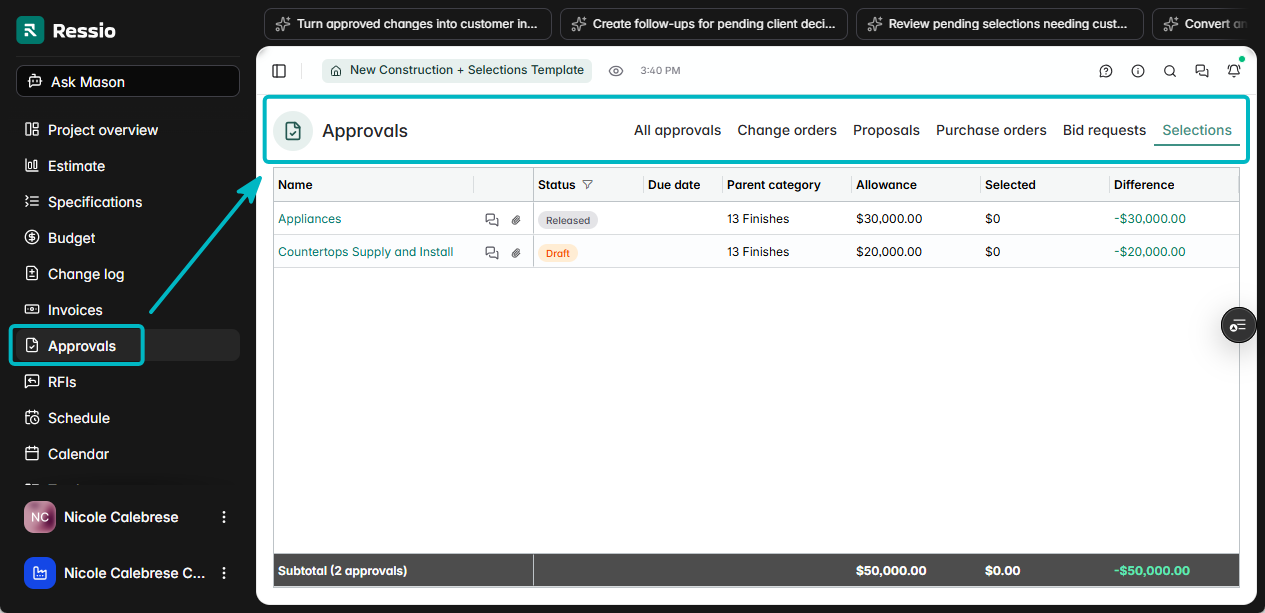
Ressio keeps scope, selections, change orders, and approvals in one record your whole team works from. Book a demo and we'll walk through where we can help you prevent the process from breaking down as you scale.
Frequently asked questions
What are the phases of the custom home building process?
Most custom builders run seven phases: feasibility, design and estimate, contract and pre-construction handoff, permitting and procurement, construction, closeout, and warranty. The phases themselves rarely cause problems. The handoffs between them do, because each one depends on a decision from the phase before it being documented and passed along.
What is the difference between custom and production home building?
The Census Bureau splits new single-family homes by purpose of construction: built for sale, contractor-built, owner-built, and built for rent. Custom work is usually contractor-built, meaning the home goes up on the owner's land to the owner's design. Production homes are built for sale on repeatable plans, which is why their process can be standardized further.
Who manages the custom home building process?
The project manager owns day-to-day execution, but ownership shifts by phase. Sales or the owner owns feasibility and the estimate. The PM owns permitting through construction. Closeout and warranty need a named owner too, and that is the gap on most jobs, because the PM has usually moved to the next start.
How do you keep the process consistent across several jobs at once?
Define the milestone between each phase: who completes it, what has to be documented, and what cannot start until it is. Then keep the record in one place both office and field can see (Ressio helps with this!)