
Buildertrend vs CoConstruct: Features, Pricing and Reviews Compared
Buildertrend acquired CoConstruct in February 2021, and CoConstruct's own website now tells customers its "transition to Buildertrend is entering its final phase." This guide compares Buildertrend vs CoConstruct on features, pricing and real reviews, explains what the merger means for a builder choosing today, and shows where Ressio, the platform we build for custom and semi-custom home builders, fits.

Ressio Staff
October 9, 2026
Buildertrend vs CoConstruct at a glance
Buildertrend is a cloud construction management platform founded in 2006 and based in Omaha, Nebraska. It describes itself as software "trusted by home builders, remodelers and specialty contractors" and says more than 1 million users in over 100 countries have chosen it.
CoConstruct was founded in 2005 in Charlottesville, Virginia, and built its software for custom home builders and remodelers. Since the 2021 acquisition it is part of Buildertrend. Buildertrend's own comparison page says CoConstruct is "now fully part of Buildertrend – no longer a separate platform," and coconstruct.com now tells customers: "Make your move now and let our team guide you through a seamless migration."
So the practical question is less "which of these two should I buy" and more "if I am on CoConstruct today, do I move to Buildertrend or somewhere else?"
Buildertrend
Buildertrend overview
Buildertrend positions itself as an all-in-one platform for residential and specialty contractors. Its pricing page says it was built for builders who "Run 5+ projects a year or manage complex, multi-phase builds" and "Want to grow from 6 to 8 figures without adding overhead." The combined Buildertrend and CoConstruct business served more than 23,000 clients at the time of the acquisition.
Buildertrend features
Buildertrend's product menu lists a broad set of tools:
- Client portal and client updates
- CRM for sales and lead management
- Estimates, bids and proposals
- Change orders
- Plans and specifications
- Scheduling
- Job costing and budgets
- Daily logs
- A sub portal for subcontractor collaboration
- Built-in AI features
The breadth is the point. Buildertrend aims to cover the whole job, from CRM and proposals through scheduling and daily logs, in one system, which suits builders running many projects at once.
Buildertrend pricing
Buildertrend starts at $499 a month for the full platform, with 10% off when you pay annually upfront. Your final price depends on your yearly construction volume and onboarding package.
Buildertrend reviews
On Capterra and Software Advice, which share the same review pool, Buildertrend holds a 4.5-star rating across 2,487 reviews.
What reviewers like:
- "It streamlines scheduling, budgeting, and communication between teams and clients, which saves a lot of time." (Jessica S., Admin, Software Advice, April 2026)
- "By introducing Buildertrend, our labour force was able to enter all daily logs from their phone." (Salina T., Construction, Capterra, July 2026)
What reviewers criticize:
- "It's extremely difficult to export your information if you ever decide to leave. There is no simple or bulk way to download years' worth of files, photos, proposals, and customer information." (Rob T., Owner, Software Advice, December 2025)
- "The product user experience is absolutely awful...Very frustrating to use." (Ryan B., Construction, Capterra, April 2025)
The pattern across reviews is consistent: Buildertrend is powerful and complete, and some smaller builders find it heavier and more expensive than their business needs.
CoConstruct
CoConstruct overview
CoConstruct was built for custom builders and remodelers, and its feature pages put client communication and selections first. Buildertrend announced the acquisition on February 24, 2021, funded by a growth investment from Bain Capital Tech Opportunities and HGGC, with CoConstruct's founder staying on as an advisor to lead integration.
Today, coconstruct.com is a migration page rather than a product page. It says CoConstruct's "transition to Buildertrend is entering its final phase" and lists what customers gain by moving. Buildertrend's FAQ answers "Are Buildertrend and CoConstruct the same?" with: "CoConstruct is part of Buildertrend."
CoConstruct features
CoConstruct's remaining feature pages describe a connected workflow for custom builders:
- Estimating where data is entered once and flows into specs, selections, bid requests, proposals, change orders, purchase orders and the budget
- Specs and selections with decision deadlines and reminder emails for clients
- Change orders generated from selection overages and scope changes, with e-signature
- Budgets organized by cost code that update as clients make decisions
- QuickBooks integration and bill management
- Scheduling with task dependencies, where moving one task updates the tasks that depend on it
- Client communication organized by topic across web, mobile and email
- Purchase orders and proposals built from the same data
- Mobile apps for iOS and Android
CoConstruct pricing
CoConstruct is not sold as a standalone product any more, so older listings that quote a starting price are stale. If you are a current customer, the price that matters is the one you will be offered to move.
CoConstruct reviews
CoConstruct's Capterra rating is about 4.7 out of 5 across roughly 800 reviews, and it is rated about 4.1 out of 5 on G2 across a much smaller number of reviews.
Reviewers on Capterra praise how CoConstruct keeps a project's contracts, plans, change orders and invoices in one place, and that clients find it easy to reply by email. The recurring complaints are about the amount of clicking, price increases, and, more recently, that the product is no longer being updated.
Moving off CoConstruct
If CoConstruct worked for you because it was built around custom homes, Buildertrend is not your only option. We build Ressio for custom and semi-custom residential builders, on the same principles CoConstruct was built on, and we ship new features every week (Ressio vs CoConstruct).
We handle the migration for you, including jobs currently in progress, along with your templates and workflows. You do not have to start over.
Take a hypothetical custom builder with three CoConstruct homes mid-build. We move all three jobs across, so nobody rebuilds a job by hand halfway through.
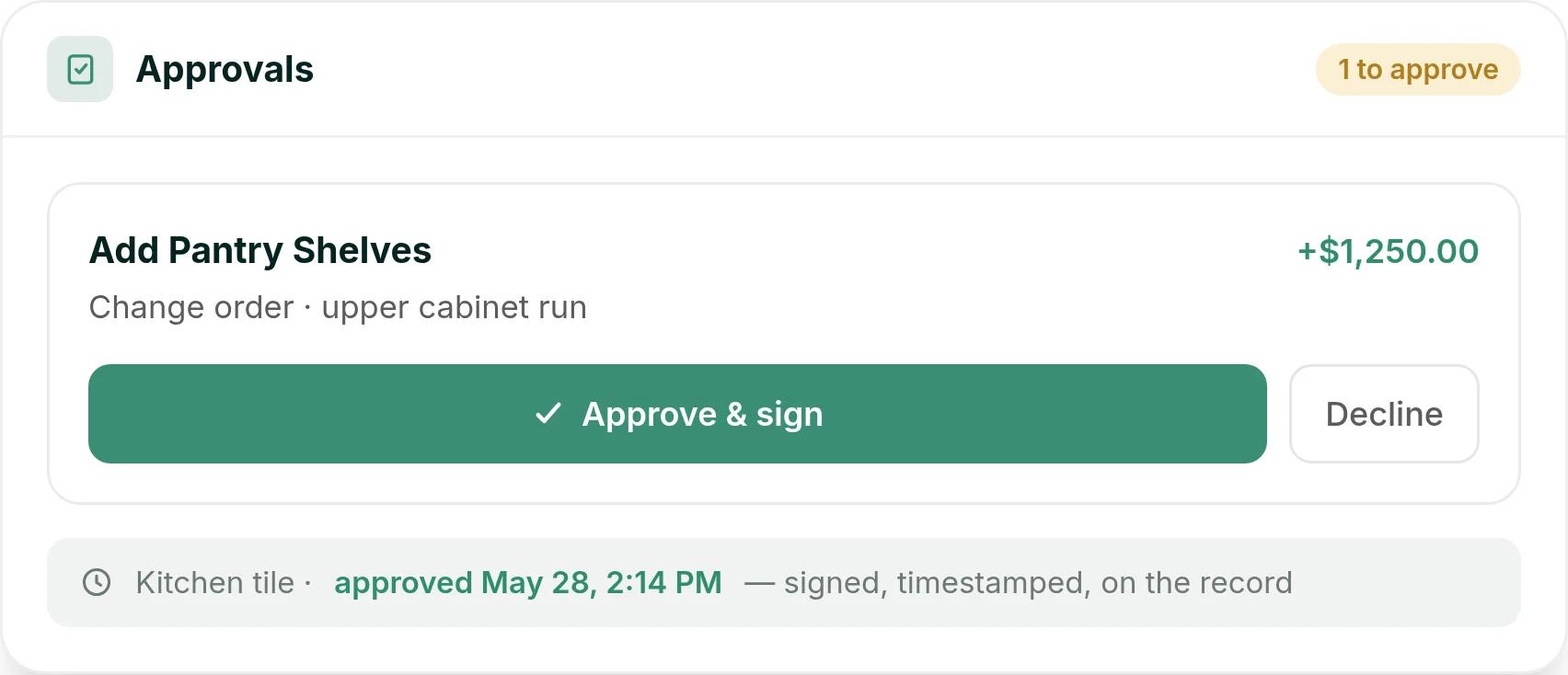
A week later, one of those clients asks for pantry shelves on the upper cabinet run. They see the $1,250 change order in their client portal and tap Approve & sign. It sits on the record next to their kitchen tile selection, approved May 28 at 2:14 PM.
Andy Kolp ran Epic Building Company on CoConstruct for years before moving to Ressio. "A major upgrade from Co-Construct and a much better user experience than the other major platforms out there," he says (read the Epic story).
Buildertrend vs CoConstruct: feature by feature
Estimating
Both products include estimating. CoConstruct's strength was entering data once and carrying it through to selections, bids and the budget. Buildertrend offers estimates, bids and proposals as part of its broader platform.
Selections
Selections were CoConstruct's signature feature, with decision deadlines and client reminders. Selections are also part of the combined Buildertrend offering that coconstruct.com now promotes.
Change orders
Both include change orders. CoConstruct generated them from selection overages and scope changes, with client e-signature.
Budgets and job costing
Both include budgets and job costing. CoConstruct organized its budget by cost code, updated it as clients made decisions, and could pull costs from QuickBooks.
Scheduling
Both include scheduling. CoConstruct's scheduling page describes task dependencies, where moving one task updates the tasks that depend on it.
Client communication and portal
Both give clients a portal. CoConstruct organized communication by topic and let clients reply by email. Buildertrend offers a client portal and client updates.
CRM and sales
Buildertrend includes a CRM for leads and sales.
Subcontractor collaboration
Buildertrend has a dedicated sub portal.
Daily logs
Buildertrend includes daily logs.
Mobile
CoConstruct offers iOS and Android apps. Buildertrend reviewers describe entering daily logs from their phones.
AI
Buildertrend markets built-in AI capabilities.
Buildertrend vs CoConstruct feature table
| Feature | Buildertrend | CoConstruct |
|---|---|---|
| Estimating | Yes | Yes |
| Proposals | Yes | Yes |
| Selections | Yes | Yes |
| Change orders | Yes | Yes |
| Budgets and job costing | Yes | Yes |
| Scheduling | Yes | Yes |
| Client portal | Yes | Yes |
| CRM and lead management | Yes | Not confirmed |
| Subcontractor portal | Yes | Not confirmed |
| Daily logs | Yes | Not confirmed |
| QuickBooks integration | Reported by review sites | Yes |
| Mobile app | Reported by reviewers | Yes |
| Built-in AI | Yes | Not found |
| Sold as a standalone product today | Yes | No |
Buildertrend vs CoConstruct alternatives: where Ressio fits
In Ressio, your estimate, selections, change orders, budget and client messages stay in one connected record. Our AI, Mason, works across all of it.
Estimating and proposals
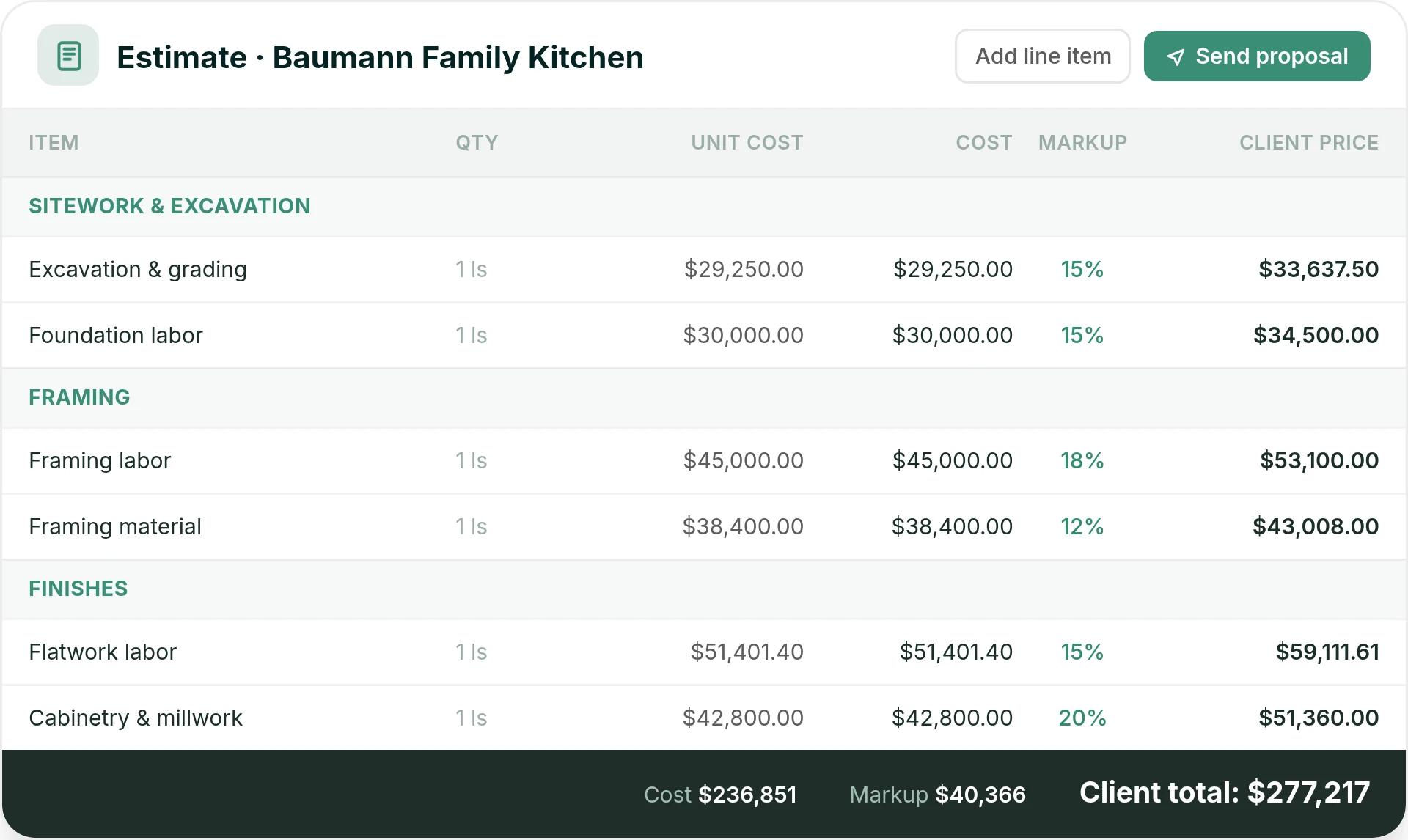
In Ressio estimating, you use NAHB, CSI, NARI or your own divisions and set your markup once. We calculate builder cost, markup and client price as you enter quantities and unit costs.
You create the proposal from the estimate in one click and send it by magic link for e-signature. When the client signs, the locked estimate becomes the job budget.
Selections and approvals
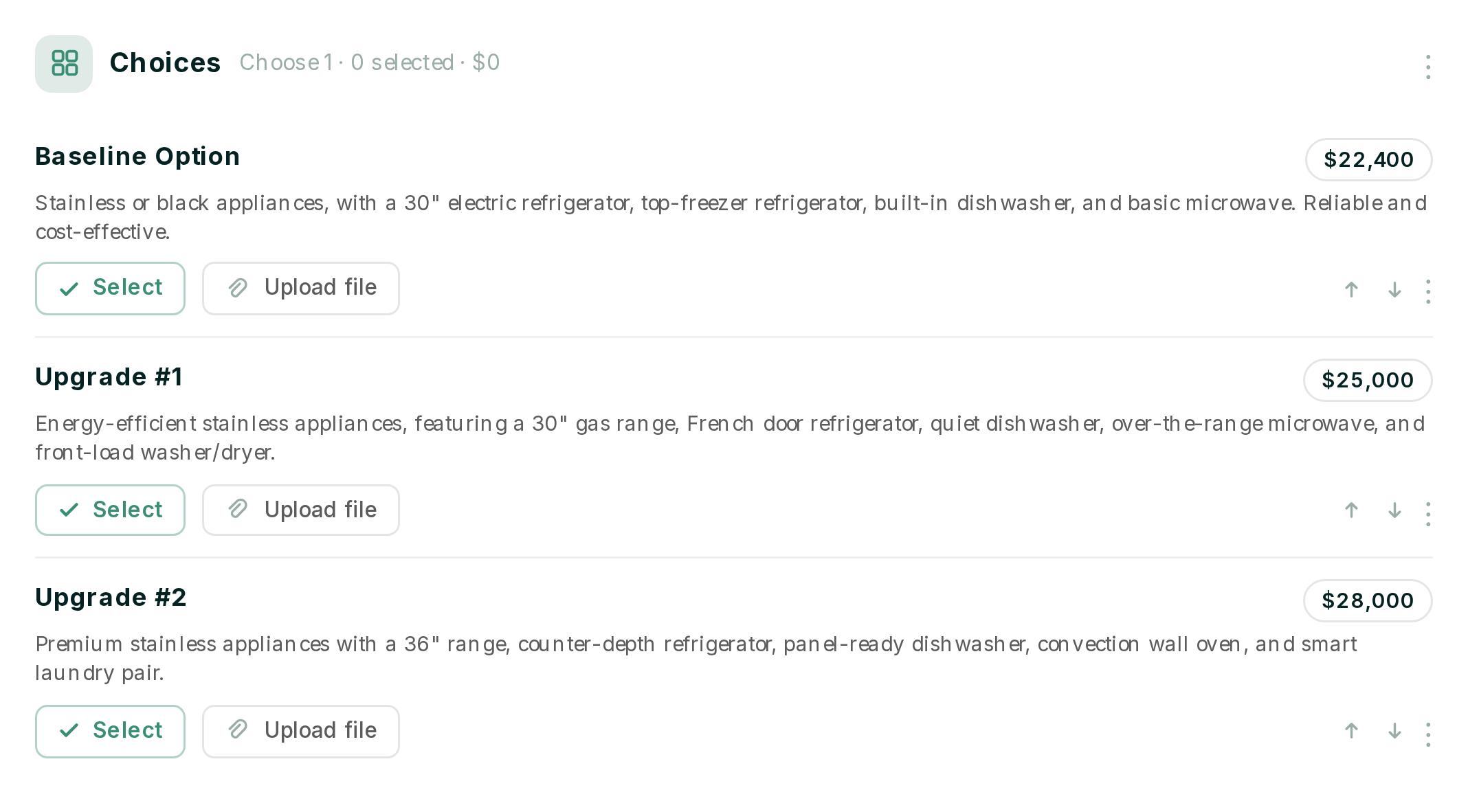
Selections were CoConstruct's signature feature, and they are central to Ressio too. In Ressio selections, your client chooses and approves options in their portal, and every approval is timestamped.
Here is a hypothetical. Your client is choosing appliances between a $22,400 baseline package, a $25,000 upgrade and a $28,000 premium package. They pick one and approve it in the portal, and the approved price updates your estimate and budget without anyone typing it twice.
Change orders and the client portal
Change orders are built from flagged estimate line items. Your client approves them in the client portal by magic link, with no app and no password.
Subs, field teams and daily logs
Subs and suppliers open our vendor portal from a link and see only their own tasks, specs and documents. Your crew fills in the daily log from the mobile app: weather, crew on site, progress, photos and delays.
Budgets, invoices and QuickBooks
Budgets show budget vs. actuals on every job in real time as costs hit. Invoices are generated from the project budget and sync to QuickBooks Online.
Mason AI
Mason reads across your estimates, budgets, schedules, selections, messages, approvals and logs to answer questions about any job. It can also draft change orders, create invoices and write daily logs, and nothing is created until you approve it.
Why custom builders choose Ressio
- Built for custom and semi-custom residential work rather than for every trade
- Estimate, selections, change orders and budget are connected, so approved decisions update the numbers
- Clients and subs open a magic link, with no account to create
- Mason AI works across the whole job
- We migrate your jobs in progress when you switch from Buildertrend or CoConstruct
Ressio pricing
Our pricing is flat, with no feature tiers and no surprise add-ons. It scales with your active projects, not seat counts, and we price it for your jobs in the demo.
Ressio reviews
Ressio holds a 5.0-star rating on Capterra and Software Advice across 36 reviews.
- "The platform's tools and features rival that of any others out there." (Ian S., NW Roots Construction, Software Advice, April 2024)
- "The pattern I see over and over: a builder buys a tool, nobody documents the process behind it, and six months later they are paying for software that three people log into. Ressio avoided that here." (Grant F., Construction, Software Advice, August 2026)
Want to see how your jobs would run in Ressio? Book a Ressio demo and bring a live project.
Buildertrend vs CoConstruct vs Ressio: quick comparison
| Platform | Best for | Strengths | Capterra rating |
|---|---|---|---|
| Buildertrend | Builders running many projects who want one broad platform | Breadth of tools, CRM, sub portal, large user base | 4.5 (2,487 reviews) |
| Ressio | Custom and semi-custom residential builders | Connected estimate-to-budget workflow, magic-link client portal, Mason AI | 5.0 (36 reviews) |
| CoConstruct | Existing customers only; now part of Buildertrend | Selections and client communication | About 4.7 (roughly 800 reviews) |
Which is best for you?
Choose Buildertrend if you run a high volume of projects, want the broadest feature set, and are comfortable with a larger platform.
CoConstruct is no longer a choice for new customers. If you are on it today, your decision is whether to move to Buildertrend or to another platform.
Choose Ressio if you build custom or semi-custom homes and want a system shaped around selections, change orders and budgets that stay connected, with AI across the whole job.
Leaving CoConstruct? We migrate your jobs in progress for you. Book a Ressio demo and walk through one of your own live jobs.
Frequently Asked Questions
Is CoConstruct being discontinued?
CoConstruct is no longer a separate product. Buildertrend acquired it in 2021, and coconstruct.com now says its transition to Buildertrend is entering its final phase and encourages customers to move.
Are Buildertrend and CoConstruct the same company?
Yes. Buildertrend's own FAQ says CoConstruct is part of Buildertrend, and the two have combined under the Buildertrend name.
How much does Buildertrend cost?
Buildertrend starts at $499 a month, with a discount for paying annually upfront. The final price depends on your yearly construction volume and onboarding package.
What is a good CoConstruct alternative for custom builders?
Buildertrend is the path CoConstruct itself promotes. Ressio is an alternative built specifically for custom and semi-custom residential builders, with connected estimating, selections, change orders and budgets.
Can I move my CoConstruct data to another platform?
Yes. At Ressio, we migrate your active jobs, templates and workflows for you, including jobs in progress.